n8n Agents vs the AI Agent Node: Which One Should You Build On?
n8n's new Agents (launched 25 September 2026) let the model choose the route instead of your canvas. Here's how they work, what they cost in executions, the self-hosting catches, and when the classic AI Agent node is still the better call.
On 25 September 2026, n8n shipped something that looks small in the sidebar and is actually a different way of building: a new Agents tab. If you've spent the last year wiring the AI Agent node into workflows, the obvious questions are whether you should rebuild everything as an Agent, whether your old workflows are about to break, and what this does to your execution bill. Short answers: no, no, and it depends on how you count turns. The longer answer is about who decides the route, you or the model, and that's worth understanding properly before you migrate anything.
What n8n Actually Shipped
The official announcement describes it simply: you tell an agent what it should do, give it a model plus the tools and workflows it may use, and it works out the steps itself. Agents are their own object inside a project, not a node on a canvas. Per the Build and manage agents docs, each one has:
- Instructions: the role, tone, constraints and response format, written in plain language.
- Tools: built-in n8n integrations, your existing workflows, custom JSON-schema tools, and MCP servers.
- Skills: reusable bundles of instructions packaged with the tools they need.
- Channels: Slack, Telegram and Linear, plus schedules, so the agent can be messaged where your team already works.
- Memory: session memory on by default (each conversation is a session), and optional episodic memory that recalls context from earlier sessions. The docs note episodic memory currently needs an OpenAI credential.
- Draft and published versions: drafts auto-save, publishing snapshots the draft for production, and you can restore earlier versions or unpublish.
- Approvals: for tools you mark as sensitive, the agent pauses and asks a human to approve or reject the call in chat before it runs.
To call an agent from a normal workflow there's a new Message an Agent node. Manual and chat runs hit the agent's current draft; production executions use its published version. It can return a typed structuredOutput against a JSON Schema you define, reuse a session ID so the agent remembers earlier messages, and stream replies.
Crucially, n8n says the existing AI Agent node "is still there and works as it always has." Nothing you built is being deprecated.
The Real Difference: Who Draws the Route
This is the mechanism that matters, and it's easy to miss under the feature list.
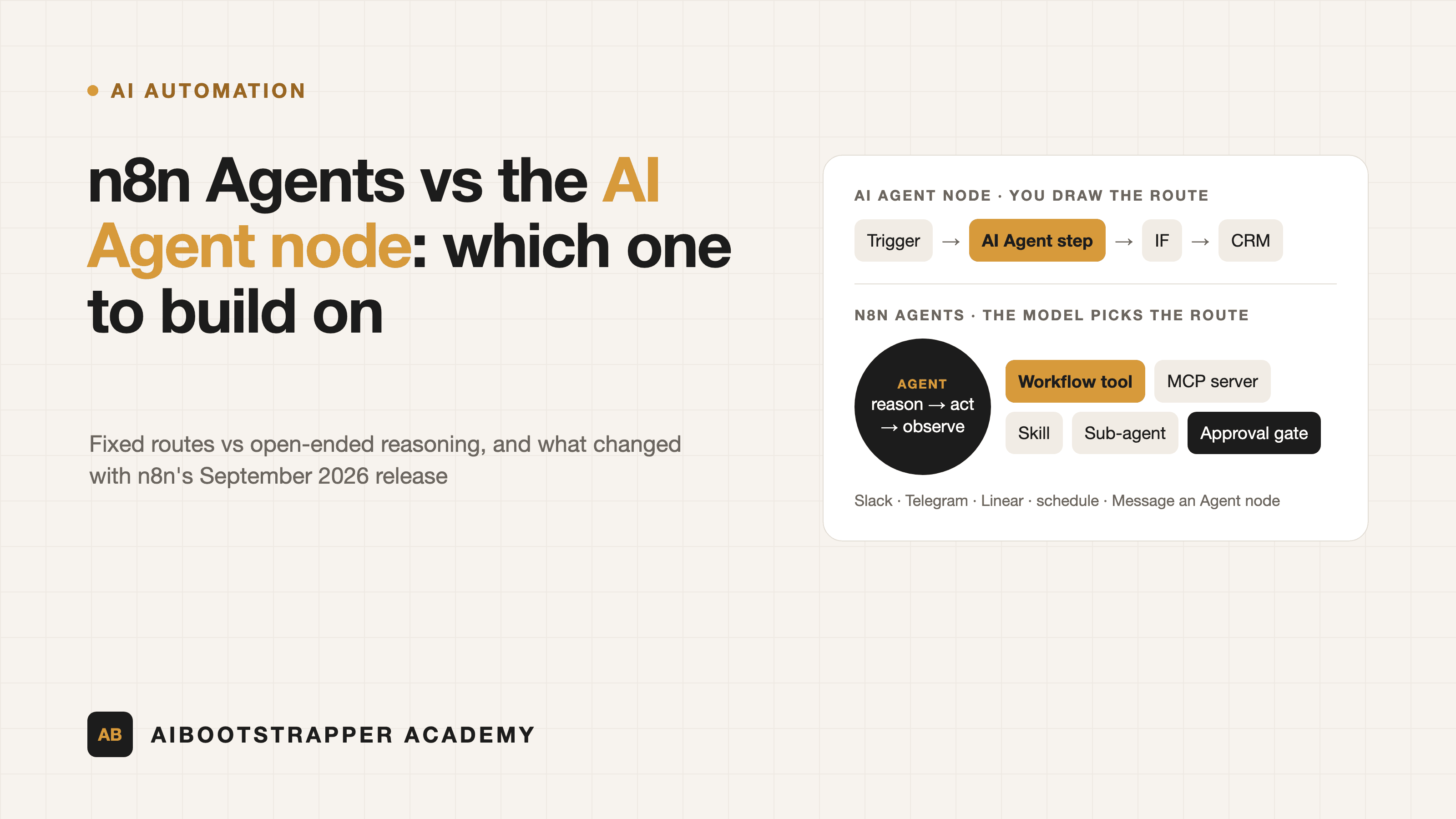
In a conventional n8n workflow, you draw the graph. A trigger fires, data moves node to node, and the AI Agent node is one bounded step: it might classify a ticket, pick from a few tools, or draft a reply, but the workflow around it decides what happens before and after. If the model misbehaves, the blast radius is that one node, and an IF node or a validation step downstream catches it. This is the pattern we walked through in how to automate a business process with AI agents.
An n8n Agent inverts that. It receives an open-ended request, then runs its own loop: reason about the request, choose a tool (or a workflow, a skill, a sub-agent), observe the result, and decide what to do next, including asking the user a follow-up question. There's no graph you drew; the route is generated at run time. That's what makes it good at messy, conversational work like "find out why this customer's invoice failed and tell me what to do," and it's exactly what makes it worse at predictable, auditable processes like "every new Stripe payment creates a CRM deal."
| Question | AI Agent node in a workflow | n8n Agents (Sept 2026) |
|---|---|---|
| Who decides the steps | You, on the canvas | The model, at run time |
| Best fit | Known sequences with one fuzzy step | Open-ended requests, chat-style work |
| Entry point | Any workflow trigger | Slack, Telegram, Linear, schedule, Message an Agent node |
| Memory | Memory sub-node you wire up | Session memory built in, episodic optional |
| Versioning | Workflow versions | Draft vs published agent versions |
| Human approval | Tool-level review you configure | Approval flag on sensitive tools |
| Status | Stable | Preview |
What It Costs: Executions, Not Just Tokens
n8n's pricing unit is the execution, so this matters. The announcement states that one turn with an agent is one execution, and tool calls to your workflows and to sub-agents don't count separately. The Message an Agent node docs confirm each message counts as one execution, the same as any other workflow run.
That's genuinely good news if your agent fans out into several workflow tools per request. The catch is that the model bill is separate: an agent that loops five times to answer one message spends five rounds of tokens with whichever provider you connected (or n8n's Gateway credits). Open-ended loops are also less predictable than a fixed workflow, so the cost guardrails in our n8n agent cost guide, like capped iterations, cheaper models for routing and rate limits, apply even more here. Building agents with the n8n Assistant also uses AI credits.
Self-Hosting Caveats You'll Hit
If you run n8n yourself, read this section before you get excited:
- You need n8n 2.32.3 or later, and you have to add agents to the N8N_ENABLED_MODULES environment variable. It isn't on by default.
- Queue mode isn't supported for agents yet. If you scaled out with workers, as covered in n8n queue mode explained, agents aren't an option on that instance today.
- Knowledge bases on self-hosted need a Daytona sandbox and are themselves in preview.
- Agents are available on all self-hosted plans except Enterprise, where support is still in progress.
- The whole feature is labelled Preview, and the docs say plainly that agents can make mistakes. Behaviour may change between releases.
One licensing note for accuracy: n8n is fair-code under its Sustainable Use License, free to self-host for internal use, but not an OSI-approved open-source licence.
Security: Same Lethal Trifecta, Fewer Walls
An agent that reads Slack messages, has access to private data through your workflows, and can send things externally is the textbook "lethal trifecta" we unpacked in n8n AI agent prompt injection and the Rule of Two. In a drawn workflow, the canvas itself is a wall: the model can only do what the next node allows. In an Agent, the tool list is the wall. So:
- Expose workflows as narrow tools with tightly typed inputs, not a generic "run any HTTP request" tool.
- Start with read-only tools, then add write tools once you've reviewed real sessions.
- Mark every tool that spends money, sends messages, or writes to a system of record as sensitive, so the approval step fires.
- Use per-tool credentials so one tool's key can't reach another system.
- Review session storage, which records steps and tool calls, during the first weeks. It's your audit log.
Free and Open-Source Alternatives Worth Knowing
If you want a visual agent builder with an OSI open-source licence, or you're blocked by the queue-mode limitation, these are the mature options:
- Activepieces (docs): MIT-licensed core, the closest like-for-like to n8n for business automation, with AI agent steps and MCP support. Our open-source workflow automation comparison goes deeper.
- Dify (docs): an LLM app platform with agent, workflow and RAG building blocks in one UI.
- Flowise (docs) and Langflow (docs): drag-and-drop agent and RAG builders, closer to developer tooling than to business automation.
None of them removes the core design decision. Every one of these tools lets you build either a fixed flow with an AI step or a free-roaming agent, and the trade-off between them is the same.
Which One Should You Build On?
The rule we use on client automation builds: use a workflow with the AI Agent node when you can write the steps down in advance, and an n8n Agent when you can only write down the goal. Most real systems end up as both. The agent handles the conversational front door in Slack, and it calls narrow, deterministic workflows as tools for anything that touches money, customers or records. Don't migrate stable workflows just because the new tab exists; migrate the jobs that currently need a human to interpret a messy request before a workflow can run.
That hybrid design, knowing where the model should choose and where the canvas should decide, is the core skill AI Automation Mastery teaches. The course builds real n8n systems end to end, including agent tool design, memory, error handling, human approval gates and production deployment, so you can adopt features like Agents on purpose rather than rebuilding everything the week a new tab ships.
Go deeper
AI Automation Mastery
Want the full AI Automation Mastery course, not just this post?
Join the waitlist and get a 20% launch discount the moment we open checkout. No payment now.
Taught by Aditya Jha · 40+ AI products shipped for real clients. No spam, unsubscribe any time.
Or join our free community for AI tips while you wait
One email a week: the AI tools, tactics, and course drops actually worth your time. No spam, unsubscribe anytime.
Questions about this or which course fits? Email academy@aibootstrapper.com and we'll answer it directly, not with a support ticket.