What Is MCP (Model Context Protocol) and How AI Agents Actually Use It
OpenAI and Google adopted Anthropic's open protocol within five months of launch. Here's how MCP actually connects AI agents to your tools, and the tool-poisoning risk most getting-started guides skip.
Every AI agent that can check your calendar, update a CRM record, or read a file from Google Drive is doing it through some connector. Before November 2024, that connector was almost always custom code: one integration for Claude to talk to Slack, a different one for ChatGPT to talk to Slack, and a third if you wanted Gemini to do the same thing. Anthropic's original announcement called this out directly: "even the most sophisticated models are constrained by their isolation from data... every new data source requires its own custom implementation." The fix they shipped, the Model Context Protocol, has since been adopted by OpenAI, Google DeepMind, and Microsoft, and by mid-2026 it's the default way agents in tools like n8n, Claude Desktop, and Cursor reach outside their own context window. Here's what it actually is, mechanically, and where it can bite you.
The integration problem MCP was built to solve
Before MCP, connecting M different AI applications to N different tools meant building roughly M×N custom integrations, because each AI vendor had its own plugin format and each tool vendor had to pick which ones to support. A Slack integration built for Claude's plugin system didn't work for ChatGPT, and a Postgres connector built for one agent framework didn't transfer to another. MCP replaces that grid with one protocol: a tool builder writes a single MCP server for Postgres, Slack, or GitHub, and any MCP-compatible AI application can talk to it without custom glue code. It's the same shape of problem the Language Server Protocol solved for code editors, and Anthropic borrowed the pattern deliberately.
How the protocol actually works
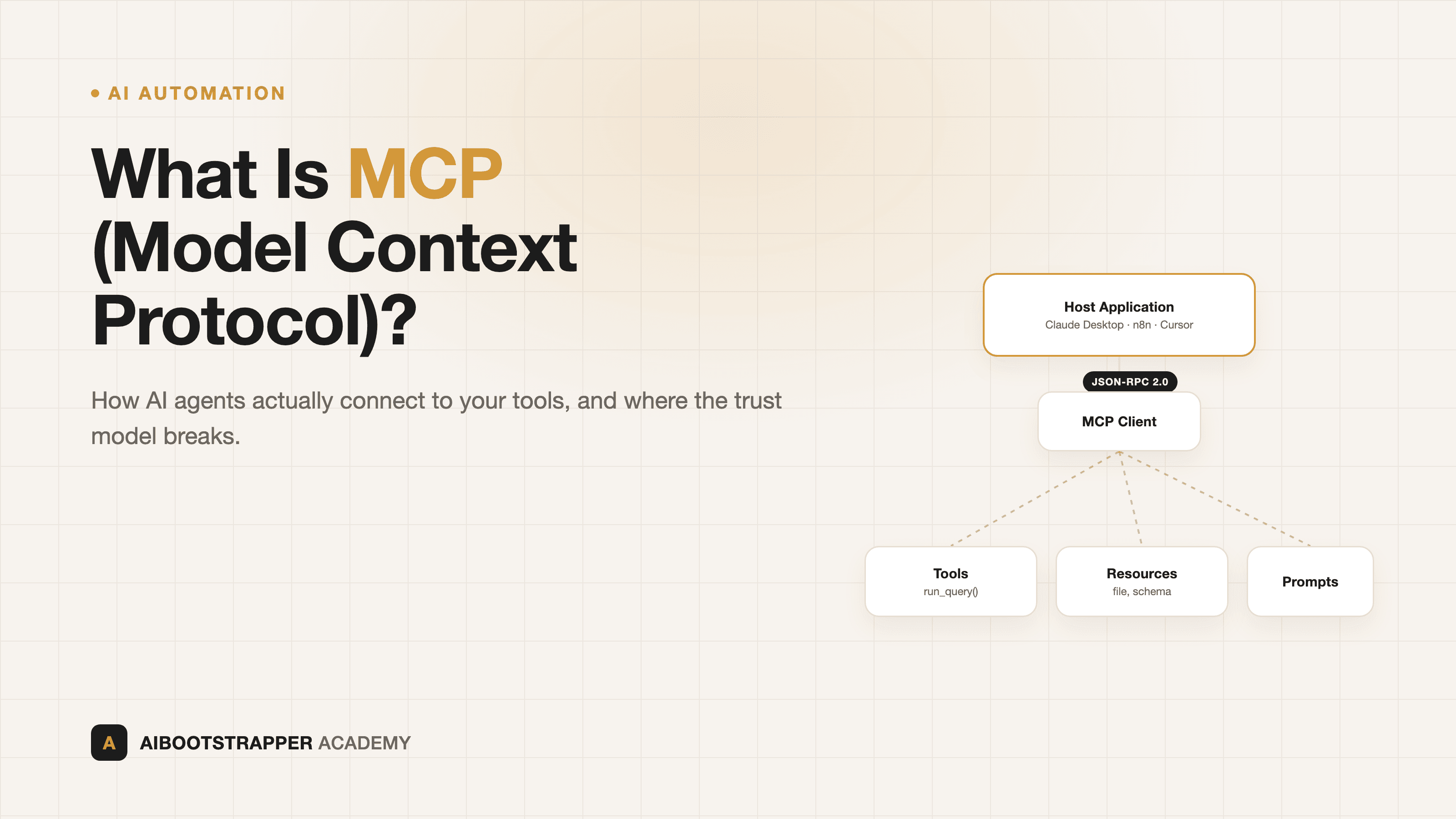
MCP runs on JSON-RPC 2.0 messages exchanged between a host application (Claude Desktop, an n8n workflow, your own agent code), an MCP client living inside that host, and an MCP server exposing a specific system. When a client connects, the two sides run a capability negotiation handshake: the server declares what it supports, and the client only calls what was actually offered. From there, an MCP server exposes three kinds of primitives:
- **Tools** — functions the model can actively call, like `create_ticket` or `run_query`, with a JSON schema defining the arguments
- **Resources** — read-only context the host can pull in, like a file's contents or a database schema
- **Prompts** — reusable, templated instructions the server suggests for a given task
The model doesn't call a server directly. It reasons in plain text about what it needs, the host's client layer translates that into a JSON-RPC `tools/call` request, and the server's response goes back into the model's context as if it were part of the conversation. Everything the model can affect in the outside world funnels through that single, typed interface, which is what makes it possible to swap Claude for Gemini for GPT behind the same tool without rewriting the integration.
Why three competing labs adopted a rival's protocol
The speed of adoption is the part worth noting. Anthropic open-sourced MCP on November 26, 2024. Four months later, OpenAI shipped support for it directly in the Agents SDK, with Sam Altman publicly endorsing it the same week. Days after that, Google DeepMind's Demis Hassabis confirmed Gemini and its SDK would support MCP too, calling it "rapidly becoming an open standard for the AI agentic era." By December 2025, Anthropic handed governance of the spec to the Agentic AI Foundation under the Linux Foundation, with Google, Microsoft, AWS, and OpenAI all backing it, and the official registry alone was tracking close to 2,000 servers at that point, up roughly 400% from its initial batch. None of the competing labs had a commercial reason to standardize on Anthropic's format. They did it because the alternative, everyone maintaining their own incompatible connector ecosystem, was worse for all of them.
Where you'll actually run into it: your automation tool
If you're building agent workflows in n8n, you're already close to MCP even if you haven't touched it directly. n8n ships both directions: the MCP Client Tool node lets an n8n agent call out to any external MCP server as one of its tools, and the MCP Server Trigger node turns your entire n8n instance into an MCP server that Claude Desktop or another external agent can call into, executing your workflows as if they were native tools. That second direction is the practical unlock: instead of rebuilding logic per platform, you build it once in n8n and expose it everywhere MCP is spoken. We cover how n8n's automation model compares to Zapier and Make on pricing and depth in n8n vs Zapier vs Make for AI agent workflows; MCP is the layer that now sits underneath all three once you're wiring in agent tool-calling rather than static triggers.
The risk nobody mentions in the getting-started guides
MCP's trust model has a real gap, and it's worth understanding before you connect a third-party server to anything with write access. OWASP now tracks "MCP Tool Poisoning" as a named attack pattern: a malicious or compromised MCP server ships a tool with an innocuous-looking name but a description containing hidden instructions, and because most clients only review tool descriptions once at connect time, those instructions land straight in the model's context on every subsequent call and get treated as trusted input. Invariant Labs' original disclosure showed this could be used to exfiltrate data or override the model's actual instructions, entirely invisibly to the user. The practical takeaway: treat every third-party MCP server the way you'd treat an unreviewed npm package with filesystem access, not a plugin from an app store. Read the source if you can, prefer servers from the official reference implementations or your tool vendor directly, and scope any API keys you hand to a server to the absolute minimum it needs.
What it actually costs to start
| Layer | Free / open-source | Paid |
|---|---|---|
| The protocol itself | MCP spec, SDKs, reference servers — fully open source | N/A, it's a spec |
| Automation host | n8n self-hosted (community edition) | n8n Cloud, hosting/maintenance included |
| Desktop client | Claude Desktop free tier, LibreChat with MCP support | Claude for Work, ChatGPT Team/Enterprise |
| Custom servers | Build your own from the reference servers as templates | Vendor-hosted managed MCP servers |
The protocol itself will never cost you anything; every real cost sits in whichever host and hosting tier you pick on top of it. If you're already running self-hosted infrastructure for privacy reasons, the same setup we walk through in self-hosting a free ChatGPT alternative with Ollama and Open WebUI can act as an MCP host too, keeping both your model and your tool connections entirely inside your own network.
Start with one server, not ten
The fastest way to get a feel for MCP without the security overhead is to connect exactly one well-known, official server, like the reference filesystem or GitHub server, to a host you already trust, and watch what actually shows up in the tool-call log before you add a second one. Most teams that get burned by MCP got burned by connecting five unreviewed community servers in their first week because the setup guide made it look trivial. It is trivial, mechanically, which is exactly why the review step matters more than the wiring step. That's the same discipline we teach for every agent-to-tool connection in AI Automation Mastery: wire the fewest tools that solve the actual job, and audit every one of them before it touches anything real.
Go deeper
AI Automation Mastery
Want the full AI Automation Mastery course, not just this post?
Join the waitlist and get a 20% launch discount the moment we open checkout. No payment now.
Taught by Aditya Jha · 40+ AI products shipped for real clients. No spam, unsubscribe any time.
Or join our free community for AI tips while you wait
One email a week: the AI tools, tactics, and course drops actually worth your time. No spam, unsubscribe anytime.
Questions about this or which course fits? Email academy@aibootstrapper.com and we'll answer it directly, not with a support ticket.