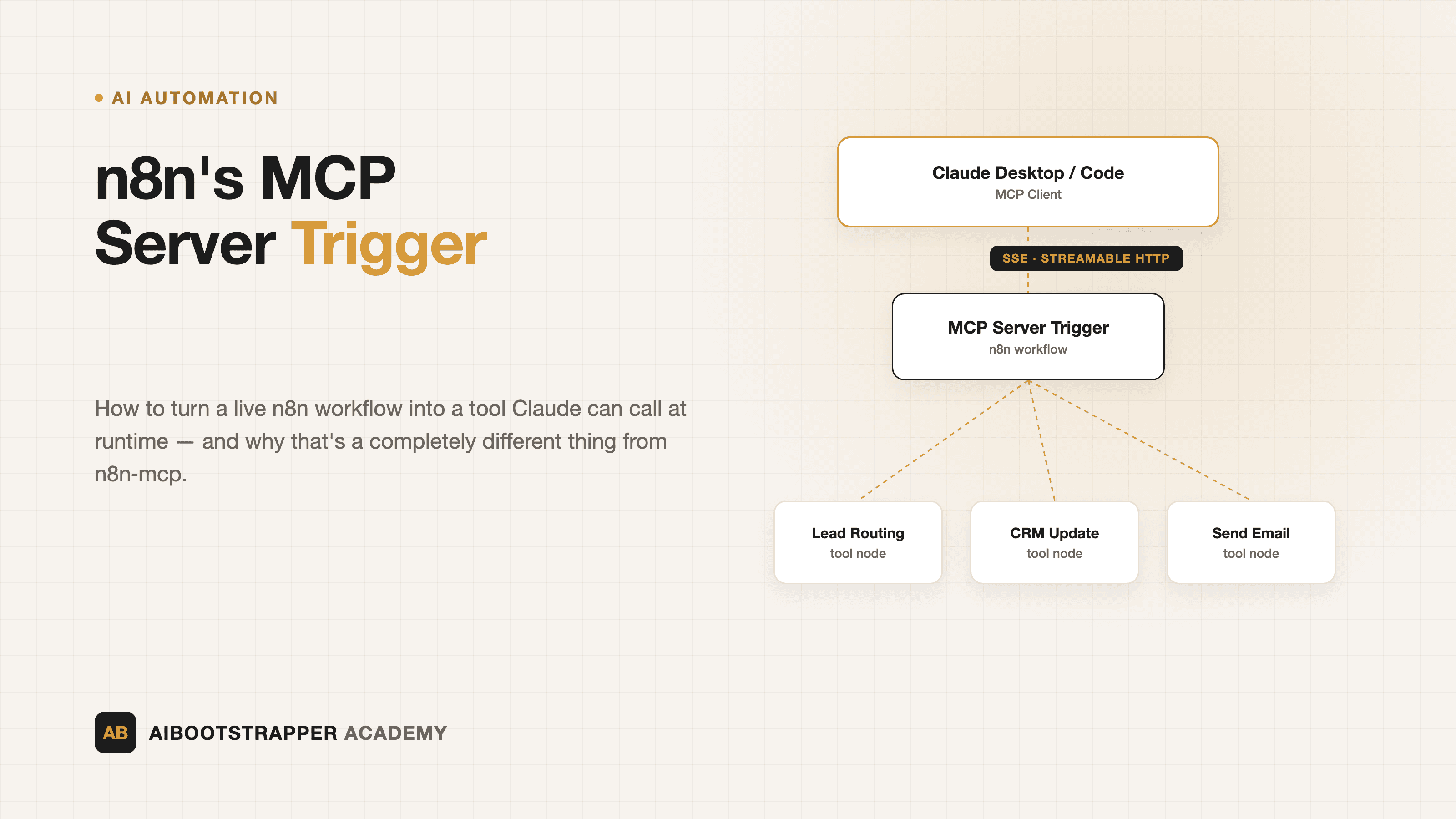
n8n's MCP Server Trigger: How to Turn Any Workflow into a Tool Claude Can Call
n8n ships two completely different things called "MCP." Here's how the native MCP Server Trigger node actually works, and how to wire a real workflow so Claude can call it at runtime.
Search "n8n MCP" and you will land on two completely different products that happen to share a name. One is a community-built server that lets Claude write n8n workflows for you. The other is a pair of nodes n8n itself ships that let your workflows become tools an AI agent can call, or call tools from someone else's server. Most getting-started guides don't separate the two clearly, which is how people end up installing the wrong thing and wondering why Claude still can't run their lead-routing workflow.
Here is what each one actually does, how the native MCP Server Trigger node works mechanically, and how to wire Claude to a real n8n workflow without guessing at the config.
Two different things, both called "n8n MCP"
The first is czlonkowski/n8n-mcp, an open-source MCP server (roughly 22,000 GitHub stars) that gives Claude Desktop, Claude Code, Cursor, or Windsurf structured documentation for thousands of n8n nodes so the model can design and validate a workflow for you, node by node. You point Claude at it, describe the automation you want, and it builds the JSON that n8n imports. It doesn't run anything in production; it's a workflow-authoring assistant.
The second is what n8n itself ships: the **MCP Server Trigger** and **MCP Client Tool** nodes, added in n8n v1.88.0 and covered in n8n's own release post. These run the opposite direction — a live n8n workflow becomes something an AI agent calls at runtime, or an n8n AI Agent node calls tools that live on someone else's MCP server. If you want MCP itself explained from scratch, that's covered in an earlier post; this one is specifically about what n8n does with it.
How the MCP Server Trigger node actually works
The MCP Server Trigger turns your n8n instance into an MCP server, per n8n's documentation. It behaves differently from every other trigger in n8n. A normal trigger (a webhook, a schedule, a form submission) fires and then hands off to the next node in a linear chain. The MCP Server Trigger doesn't do that. It only connects to and executes **tool nodes** attached to it — an MCP client connects, asks "what tools do you have," gets a list back, and calls whichever one it needs. Nothing downstream runs until a client actually invokes a specific tool.
It supports two transports: Server-Sent Events (SSE), a long-lived HTTP connection, and streamable HTTP. It does not support stdio, the transport most local MCP servers use, which matters if you're trying to wire it into a client that expects a local process rather than a URL — Claude Desktop and Claude Code both support remote SSE/HTTP servers, so this isn't usually a blocker.
Like any n8n trigger, it generates a test URL (active while you're editing) and a separate production URL that only goes live once you publish the workflow. Point Claude at the test URL while you're debugging tool calls, and switch to the production URL before anything depends on it.
Building your first exposed tool
You expose an actual workflow by attaching a **Custom n8n Workflow Tool** node to the MCP Server Trigger. That sub-node points at the workflow you want callable, and the description you give it is what the LLM reads to decide when to call it — vague descriptions get skipped or misused, so write them the way you'd brief a new hire on when to use a specific tool, not what it's named.
A practical first tool: take the lead-classification workflow from an earlier business-process automation post — the one that reads a form submission and routes it to sales, support, or spam — and expose it as an MCP tool instead of only running on a webhook. Now Claude Desktop can call "classify_and_route_lead" directly from a chat, on demand, instead of you triggering it manually or waiting for the form.
Authentication: don't skip this
An MCP Server Trigger URL is a live endpoint into your automations, so treat it like any other API you'd expose. n8n supports Bearer token and generic header authentication out of the box, and the MCP Server Trigger node (v2+) added n8n OAuth2 as an option, letting the workflow require a valid OAuth 2.1 bearer token scoped specifically to that MCP endpoint. If you're exposing anything that touches customer data or writes to a CRM, OAuth2 or a rotated bearer token is the right default — an unauthenticated endpoint means anyone with the URL can invoke the workflow.
The other direction: pulling in someone else's tools
The MCP Client Tool node runs the reverse pattern: it connects an n8n AI Agent node to an *external* MCP server, so your agent can call tools it doesn't own. You configure an SSE endpoint, then choose to expose all of that server's tools, a specific subset, or all-except-some — useful when a server offers more than your workflow should touch. It supports Bearer, generic header, multiple-header, OAuth2, or no auth at all, per n8n's node docs. In practice this is how you'd give an n8n agent access to a GitHub MCP server, a Postgres MCP server, or any other tool provider without writing a custom HTTP Request node for each one.
Connecting Claude to your n8n server
Once a workflow is exposed through the trigger, add it as a remote MCP server in Claude Desktop or Claude Code the same way you'd add any other MCP server: the SSE or streamable-HTTP URL from the trigger node, plus whichever auth method you configured. From that point, Claude sees your exposed workflows as ordinary tools it can call mid-conversation — no separate API, no webhook you have to trigger by hand. n8n's community announcement thread is worth skimming for real setup issues other users hit first.
Where this fits against Zapier Agents and Make's Maia
Zapier and Make both shipped their own agent layers this year — Zapier Agents and Make's Maia — but neither exposes a workflow as a standards-based MCP endpoint the way n8n does; they keep agent behavior inside their own platform. The tradeoff between the three platforms on pricing and where an agent actually earns its complexity is covered in an earlier n8n vs Zapier vs Make comparison. MCP support is the reason n8n specifically is the one worth reaching for when the requirement is "any MCP client, including tools you haven't picked yet, needs to call this workflow" rather than "this automation only ever needs to run inside one platform."
If you're building AI-driven workflows and want the fuller picture — when to reach for an automation platform at all, how to structure fallbacks, and where agents genuinely earn their complexity — that's the ground covered in the AI Automation Mastery course.
The gotchas that aren't in the quickstart
The trigger only fires tool nodes, so if you connect a node that isn't a recognized tool type, nothing happens and there's no obvious error to point you at why. Test URLs stop working the moment you close the editor tab in some client setups, which reads like a broken connection rather than an expected test-vs-production distinction. And because the trigger doesn't pass data to a downstream chain like a webhook does, any logging or auditing you want on tool calls has to happen inside the tool workflow itself, not bolted on after the trigger. None of these are hard problems, but they're the ones that eat an afternoon if nobody tells you in advance.
Go deeper
AI Automation Mastery
Want the full AI Automation Mastery course, not just this post?
Join the waitlist and get a 20% launch discount the moment we open checkout. No payment now.
Taught by Aditya Jha · 40+ AI products shipped for real clients. No spam, unsubscribe any time.
Or join our free community for AI tips while you wait
One email a week: the AI tools, tactics, and course drops actually worth your time. No spam, unsubscribe anytime.
Questions about this or which course fits? Email academy@aibootstrapper.com and we'll answer it directly, not with a support ticket.