How to Measure AI ROI in Your Business: Why 9 in 10 Executives See No Productivity Change
An NBER survey of nearly 6,000 executives found 69% of firms use AI but about nine in ten see no productivity or employment change. Here is the baseline-first method a founder can use to find out whether their own AI spend pays off.
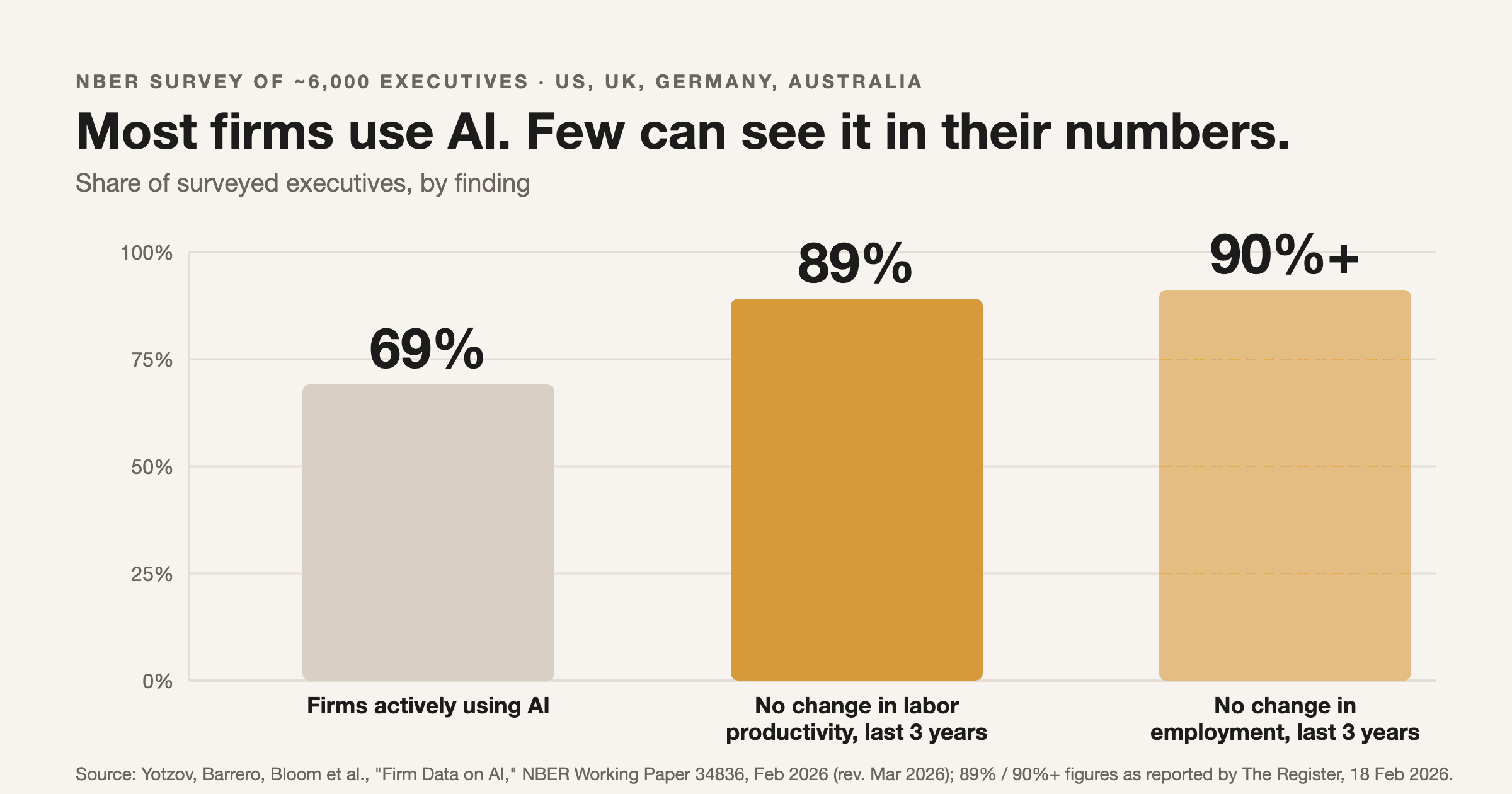
In February 2026, a team of economists including Nicholas Bloom and Steven Davis published survey results from nearly 6,000 senior executives across the US, UK, Germany and Australia. 69% of their firms actively use AI. Yet roughly nine in ten executives said AI had produced no change in employment or productivity over the previous three years, and the executives themselves were averaging only 1.5 hours a week with the tools. If you run a company and have paid for AI licenses, that pattern probably sounds familiar: lots of usage, no line on the P&L you can point to. This post is about the unglamorous fix, which is measuring AI the way you would measure any other investment.
What the NBER data actually says (and doesn't)
The paper is "Firm Data on AI" (NBER Working Paper 34836, February 2026, revised March 2026), by Ivan Yotzov, Jose Maria Barrero, Nicholas Bloom and colleagues. Its abstract reports that 69% of firms actively use AI, that more than two-thirds of executives use it personally, and that "nine-in-ten" report no employment or productivity effect over three years. The Register's coverage puts the productivity figure at over 89%, measured as sales per employee.
Read it carefully, though. This is a survey of executives' own reports, not a controlled experiment, and it measures a period when most firms were still in early deployment. A second NBER paper, "Artificial Intelligence, Productivity, and the Workforce: Evidence from Corporate Executives" (March 2026), surveyed about 750 executives and found positive productivity gains across sectors, but noted that perceived gains exceed measured gains. Put the two side by side and the honest conclusion is not "AI doesn't work." It is that most firms cannot yet tell whether it worked for them, which is a measurement problem before it is a technology problem. For the failure patterns on the deployment side, see why AI pilots fail and how to be in the 5%.
Why "it feels faster" is not evidence
The best-known demonstration of the perception trap is the 2025 METR randomized controlled trial: 16 experienced open-source developers completed 246 real tasks in their own repositories, each task randomly assigned to allow or forbid AI tools. Developers predicted AI would make them 24% faster and afterwards estimated it had made them 20% faster. Measured completion time said they were 19% slower.
That result is now dated. In its February 2026 update, METR says it believes developers are likely more sped up by AI now than in early 2025, while warning that selection effects make its new data very weak evidence of the size. So the lesson isn't "AI slows people down." The lesson is that a person's own sense of their speed was off by roughly 40 points in the study, and that could go either direction with today's tools. You can't manage what you only feel.
Step 1: Pick one workflow and record the baseline before you switch AI on
The most common ROI mistake is turning the tool on first and trying to reconstruct "before" from memory. Instead, choose one workflow with a countable output: proposals sent per week, support tickets resolved per agent-day, hours from inbound lead to first reply, invoices processed per person. Record two to four weeks of normal performance first. That baseline is the denominator for everything that follows.
Then define, in writing and before launch, what result would make you scale the workflow, fix it, or kill it. A rule like "if median lead-response time doesn't fall by at least a third after 60 days, we stop" is worth more than any dashboard, because it stops sunk-cost drift.
Step 2: Count the full cost, not the licence fee
An AI workflow's cost is more than the subscription. Include:
- The licence or API spend (token costs, seat fees)
- One-time setup and integration time, spread over a realistic lifetime such as 12 months
- Human review time on AI output, the overhead METR identified as a main source of its slowdown
- Ongoing maintenance when prompts, models or connected tools change
Net monthly value is then simple: (hours saved x loaded hourly cost) plus any measured revenue lift, minus all four cost lines above. "Hours saved" must be computed from the before/after metric on the same task, not from a survey asking staff how much time they think they saved.
Step 3: Use random assignment when you can, before/after when you can't
METR's design is worth borrowing at small scale. If your team handles a stream of similar tasks, randomly assign each one to "with AI" or "without AI" (a coin flip in a spreadsheet works) and compare completion time and quality. That controls for busy weeks, seasonality and the tendency to hand AI the easy jobs.
With a five-person team you often can't randomize cleanly, so use the before/after baseline and be honest about its limits: a good quarter can flatter it and a new hire can distort it. Check quality alongside speed, such as error rates, rework, customer complaints or win rate, because a faster process that ships more mistakes is not a gain.
A free, open-source measurement stack
You don't need a paid analytics platform to do this.
- **Langfuse** logs every LLM call with tokens, latency and cost, and supports custom prices for self-hosted models. Repo: github.com/langfuse/langfuse; docs: token and cost tracking.
- **n8n** can timestamp each workflow run and write it to a table, giving you the "hours from trigger to done" metric automatically. Repo: github.com/n8n-io/n8n; docs: docs.n8n.io. Its licence is source-available rather than OSI open source, so check it suits you.
- **Metabase** turns that table into a dashboard your leadership team will actually open. Repo: github.com/metabase/metabase; docs: metabase.com/docs.
For a bootstrapped team, a spreadsheet with four columns (date, task, minutes, quality check) beats any of these on day one. Add tooling once the habit exists. The cost side pairs with the guardrails in n8n AI agent cost guardrails.
Step 4: Decide, then rank the next bet
At day 60 or 90, compare against your pre-written rule and make the call: scale, fix or kill. Two honest caveats. First, a single workflow's result won't generalize automatically; the super-user gap shows individual gains often stay trapped in individuals. Second, some benefits, such as better decision quality, resist clean metrics; write down your proxy and its weakness rather than pretending it isn't there.
The larger skill is what you do with the answer: rank the next candidate workflows by expected return and fund the top one. AIBOOTSTRAPPER client Daniel Wong (COO, RegTech, Hong Kong) described that kind of output from our AI consultancy work as "a roadmap we could actually act on... where AI would make money, ranked by ROI." That is client feedback on our consulting, not a course review.
Where to go deeper
If you'd like a structured way to do the ranking step, AI Leadership for Founders is a strategy course, not a build course: you score your AI readiness across six areas, produce a one-page ranked AI opportunity audit, and leave with a 30-day leadership plan. This post gave you the measurement method for a single workflow; the course covers deciding which workflows deserve to be measured first and defending that list to your board.
Go deeper
AI Leadership for Founders
Want the full AI Leadership for Founders course, not just this post?
Join the waitlist and get a 20% launch discount the moment we open checkout. No payment now.
Taught by Aditya Jha · 40+ AI products shipped for real clients. No spam, unsubscribe any time.
Or join our free community for AI tips while you wait
One email a week: the AI tools, tactics, and course drops actually worth your time. No spam, unsubscribe anytime.
Questions about this or which course fits? Email academy@aibootstrapper.com and we'll answer it directly, not with a support ticket.